


TrackMyTour
3.44.00 Reviews
App Specs
- Version
- 6.3.3
- Updated On
- License
- Free
- Downloads
- 10,000+
- Developer
- TrackMyTour
- Categories
- Travel & Local
- Platform
- Android
Screenshots
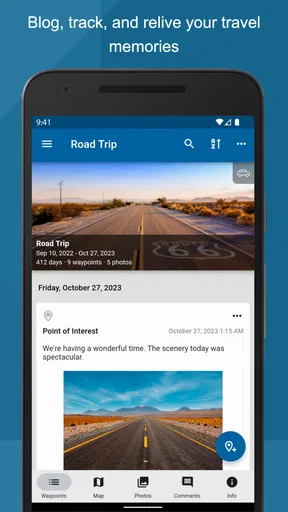
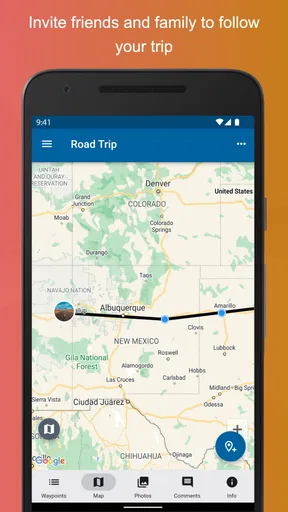
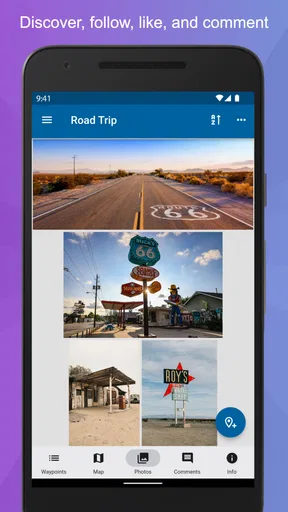
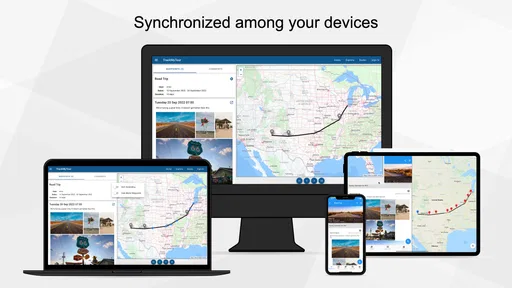

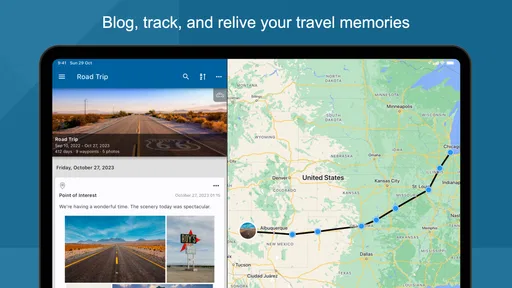
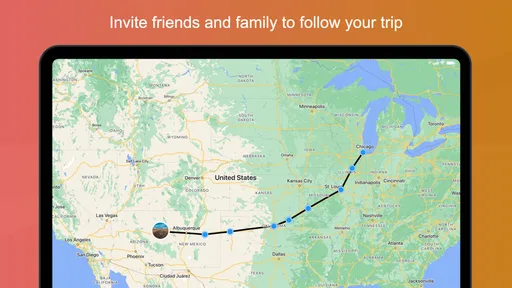
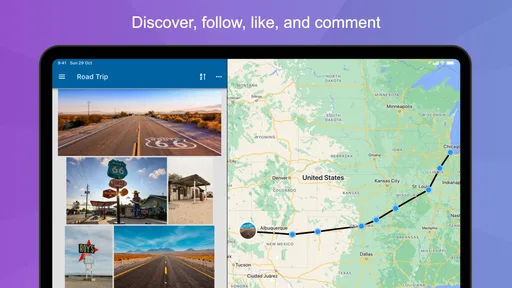
 Analysis by AppCompare
Travel apps often promise to make sharing a journey simple, yet the real test begins when a trip is already moving: a phone has a weak signal, another person cannot see the shared route, or a book-like travel record does not look the way you expected. I approached TrackMyTour with that practical situation in mind. Developed by TrackMyTour, this free Travel & Local app is built around sharing journeys and keeping them in a more lasting, readable form than a stream of temporary messages.
My overall impression is that it makes the most sense for people who want a trip to become something others can follow and revisit, rather than merely a collection of isolated location updates. It is available for Android devices running version 8.0 or later, and the current version is 6.3.3. The app has passed ten thousand installs, while its average rating sits at 3.4 from roughly thirty ratings. That combination tells me to approach it as a useful, focused travel tool that may require patience during setup, not as a universally polished replacement for every map or messaging app.
Where the experience usually gets stuck
The first difficulty is understanding what kind of tool this is. TrackMyTour is not simply a navigation app for getting from one street to the next. Its store summary points toward “Travel Sharing & Books,” which suggests two connected uses: letting other people follow a tour and preserving the trip as a readable record. If you open it expecting turn-by-turn directions or the same instant simplicity as a familiar messenger, the workflow can feel less obvious.
I would begin by deciding what the trip needs before touching the settings. If the goal is to show family where I am during a long journey, I would treat the sharing side as the priority. If I want to document a holiday for later, I would think about the trip as a sequence that needs context, not just a moving dot. This small distinction prevents a common mistake: trying to use every part of the app at once before understanding the main purpose.
Another likely sticking point is the handoff between the person creating the tour and the people following it. A travel-sharing app depends on more than one person, so confusion can appear even when the app itself is working. The creator may believe the tour is ready while a friend is looking at an old message, an incomplete invitation, or the wrong screen. I find it safer to test the sharing process with one trusted person before relying on it for a group trip.
There is also a mental adjustment involved in the “Books” part of the experience. A travel record is more useful when it is treated as an ongoing story rather than a live dashboard. That means I would not judge the app only by how quickly a location appears. I would also consider whether the resulting record helps someone understand where the journey went, what mattered, and what they may want to remember later.
The mature age classification is worth noticing before installing it on a shared family device or recommending it to a younger traveler. The app is marked Mature 17+, so I would not assume it is intended for children simply because the subject is tourism. That is a small detail, but it matters when several people use the same tablet or when a parent is choosing a travel tool for a family itinerary.
Worth Reading Before You Choose

Flipboard Shows What News Apps Must Do Beyond the Feed

Switching to Android Auto Means Rethinking Your Driving Routine

Google Calendar Makes a Crowded Week Easier to Manage

Ludo King Makes the Most of the Minutes Between Plans

Baby Panda World Brings Quick Play to Modern Phones, but Its Game Library Feels Busy

ESPN’s Live Game View Makes Following Close Games Easier
Why a first test is more valuable than a rushed launch
My strongest practical recommendation is to perform a short trial before the actual departure. Create the kind of tour you expect to use, ask one person to view it, and then close and reopen the relevant screens. This exposes misunderstandings about the sharing flow while there is still time to correct them. It is a more useful test than merely installing the app and assuming that a successful download means the trip is ready.
For a group holiday, I would also nominate one person as the main organizer. Multiple people changing the same travel record can make it unclear who is responsible for updates. A single owner keeps the workflow easier to explain: one person prepares and shares, while everyone else follows or contributes only when needed. This is not a claim about a special app setting; it is a sensible way to reduce human error around a shared journey.
Setup checks that prevent avoidable confusion
Before using TrackMyTour on the road, I would check the basics in a deliberate order. First, confirm that the phone meets the Android requirement and that the app has finished updating. The current release is 6.3.3, so keeping the installation current is a reasonable first step when troubleshooting. I would then restart the app after an update rather than immediately judging it from a screen that was open before the update completed.
Next, I would make sure the device itself has a stable connection at the moment the tour is created or shared. A weak connection can make a normal action look as if it failed, especially when the user taps again and accidentally creates uncertainty about which attempt succeeded. Waiting briefly, checking that other online content loads, and then trying once more is better than repeatedly pressing the same control.
I would prepare the tour while stationary, preferably before leaving home or the hotel. This gives me time to read each screen and notice whether I am creating a new journey, viewing an existing one, or trying to share something that has not been completed. Mobile apps are harder to interpret when the user is walking through a station, carrying luggage, or switching between cellular coverage areas.
For the person receiving the shared trip, I would send clear instructions along with the invitation or sharing details: what to open, what they should expect to see, and whom to contact if it does not appear. This sounds basic, but it solves a surprisingly common problem. The follower may not know whether the tour is supposed to open inside TrackMyTour, whether it should be refreshed, or whether the organizer has sent an older version of the information.
I would also check the phone’s general battery condition before relying on any travel-sharing workflow. Location-related use can be demanding on a phone, and a device in low-power mode may behave differently from the device used during the initial test. I would carry a power bank for a long day and avoid treating the app as a substitute for a printed address, a saved booking detail, or another independent way to find the group.
One useful habit is to separate “the app cannot open” from “the tour is not updating.” Those are different problems. If the application itself will not launch, I would restart the phone and try again after checking the connection. If it opens but the shared journey looks unchanged, I would first verify that the organizer has actually made a new update and that the viewer is looking at the intended tour. This simple separation prevents random troubleshooting.
What I would prepare before inviting other people
I would give the tour a recognizable identity and keep the sharing message short. The point is not to overload travelers with instructions; it is to make the correct journey easy to identify. If several trips or old records are visible, a clear name or description reduces the chance that someone follows the wrong one.
I would also explain the limits of live sharing to the group. A shared travel record should be treated as helpful information, not as an emergency service or a guarantee of constant visibility. If someone is meeting me at a station, I would still send the meeting point directly. If someone is worried about my safety, I would use the appropriate emergency contact method rather than relying on a travel app alone.
Because in-app purchases are listed at $19.99 per item, I would review any purchase prompt carefully before confirming it. The app itself is free to install, but “free” does not mean every possible item or upgrade inside the experience is included. I would decide in advance whether the basic workflow meets my needs and avoid buying anything simply because I am under time pressure before a trip.
Recovering a workflow when something goes wrong
When a shared tour seems stuck, I would avoid deleting it immediately. First, I would note what was working: could the organizer open the journey, could the follower open the shared information, and was the problem limited to new updates? Keeping that distinction matters because deleting and recreating a tour can make it harder to tell whether the issue came from the device, the connection, or the sharing handoff.
My recovery sequence would be simple. I would close and reopen the app, check the connection, and revisit the same tour rather than starting a second one. If the issue affects only one viewer, I would ask that person to restart the app and confirm that they are using the latest shared details. If everyone sees the same problem, I would test the organizer’s device and connection before asking every participant to repeat the same steps.
For a trip that is already underway, I would keep a parallel communication channel available. A group message can tell people that the tour is being refreshed, while a phone call can handle an urgent meeting change. This does not make TrackMyTour less useful; it recognizes that travel tools work best as part of a small system. The app can hold the journey record, while ordinary communication handles immediate exceptions.
A particularly useful recovery habit is to record the last point everyone agrees was correct. Suppose the group saw the route earlier but later notices no visible change. I would tell them the last confirmed location and provide the next meeting instruction separately. That gives people something actionable instead of making them repeatedly refresh a screen without knowing whether the information is current.
I would be cautious about reinstalling as a first response. Reinstallation can remove local context or force the user to repeat setup, and it does not repair a poor connection or an incorrectly shared tour. I would reserve that step for a persistent app-level problem after the simpler checks have failed, and I would make sure I know how to access the relevant trip information again before removing anything.
How to make the travel record more useful afterward
The long-term value of the app is easier to appreciate after the journey than during a hectic travel day. I would review the completed record when I have time, looking for the parts that deserve explanation rather than assuming the path speaks for itself. A route can show movement, but a useful travel book should help me remember why a stop mattered or how one place connected to the next.
This is where TrackMyTour differs from a standard map timeline. A map is excellent when I need to find a place or estimate a route. A messenger is better when I need to send a quick update to a friend. A photo gallery is better for visual memories. TrackMyTour appeals when I want the journey itself to remain the organizing structure, with sharing and a book-like record connected to that structure.
That difference also creates a trade-off. If I only need directions to a restaurant, opening a familiar map is likely faster. If I only need to tell someone that I arrived, a message may be simpler. I would choose TrackMyTour when the trip has enough movement, participants, or narrative value that a dedicated shared record earns its place on the phone.
When the app is not the cause
Travel problems are often blamed on the most visible tool. A delayed update may actually come from a tunnel, a crowded venue, a congested network, a nearly empty battery, or a phone that has restricted background activity. I would test ordinary internet access and the phone’s general responsiveness before concluding that TrackMyTour has failed. If other apps are also struggling, the problem is probably broader than this one.
The person viewing the journey can also be the source of the confusion. They may have opened an old shared item, switched accounts or devices, or misunderstood which journey the organizer meant. I would ask for a screenshot or a precise description of what appears on their screen instead of relying on “it does not work.” That turns a vague complaint into a checkable problem.
There are cases where a different tool is plainly better. For precise navigation, current road conditions, public transport directions, or finding a nearby business, I would use a dedicated mapping service. For urgent safety communication, I would contact the relevant emergency service or a trusted person directly. For a simple holiday album, a photo-sharing service may involve less preparation. TrackMyTour is most convincing when the central need is a shared tour that can remain meaningful after the live movement ends.
I would also skip it if I dislike any setup that asks me to think about the journey as a shared object. Some travelers want zero coordination: open an app, search for a destination, and leave. This product is a poorer fit for that habit. Its value grows when the organizer is willing to prepare the trip, explain the sharing step, and help participants understand what they are viewing.
The rating of 3.4, based on around thirty ratings and a small number of written reviews, reinforces my cautious approach. I do not read that figure as proof that the app is poor, but I also would not use it as evidence that every traveler will have a seamless experience. It suggests that personal expectations and setup conditions may strongly affect satisfaction, which is exactly why I would test the workflow before a major trip.
The developer name, TrackMyTour, matches the app’s focused identity rather than suggesting a broad travel marketplace or a full navigation suite. That focus is helpful if I want one place for a journey’s shared progress and lasting record. It is less helpful if I expect restaurant bookings, ticket management, detailed navigation, or a large travel-planning ecosystem in the same package.
My practical verdict after using it as a travel companion
I see TrackMyTour as a specialized companion for travelers who want to share the shape of a journey and preserve it in a book-like format. The strongest use case is a road trip, group adventure, or extended holiday where one person can organize the record and others benefit from following it. The app is free to start, supports older Android devices from version 8.0 onward, and has a clear enough purpose once I stop treating it like an ordinary map.
My recommendation comes with conditions. I would install it before departure, run a private test with one viewer, confirm that everyone understands the sharing handoff, and keep ordinary communication and navigation alternatives ready. I would also read purchase prompts carefully because individual in-app items are listed at $19.99. Those steps are not unnecessary ceremony; they are what turns a potentially confusing travel workflow into a dependable one.
The best reason to choose TrackMyTour is continuity: one journey can serve both the people following it now and the people remembering it later. The main weakness is that this benefit depends on preparation and cooperation, so it will not feel worthwhile for a quick location update or a one-off direction request. For those tasks, a messenger or map is more efficient.
After weighing the practical friction against the distinctive idea, I would recommend it to organized travelers, tour leaders, and friends who enjoy keeping a coherent record of where a trip went. I would not make it my only travel safeguard, and I would not suggest it to someone seeking instant navigation with no setup. Used within its proper role, however, it offers a thoughtful alternative to scattered messages and disconnected map history: a shared travel story that can still have value when the journey is over.
Pros
- Easy-to-follow GPS tracking for monitoring tours in real time.
- Useful route history helps review completed trips afterward.
- Can improve group coordination during guided tours or excursions.
- Location sharing adds reassurance for family and travel companions.
- Designed for travelers who need tour information in one place.
Cons
- Continuous GPS use may noticeably reduce battery life.
- Accuracy can vary in areas with weak mobile or GPS signals.
- Some features may depend on an active internet connection.
- Location sharing can raise privacy concerns for cautious users.
- The interface may feel less useful outside organized tours.
FAQs for TrackMyTour
What is TrackMyTour and who is it designed for?
TrackMyTour is a travel-tracking application designed to help users record and share their journeys. It can be useful for road trips, hiking excursions, group tours, school trips, and family holidays. After reviewing its main functions, the app appears most valuable for people who want to create a visual travel diary, follow a route on a map, and let friends or relatives keep up with their location and trip progress.
How does TrackMyTour record and share a journey?
The app generally allows you to create a tour, add locations or updates, and document your route with map-based information, notes, photos, and other travel details. Depending on the settings you choose, a tour can be shared with selected people or made accessible through a link. Before starting, it is worth checking the sharing options carefully, especially if you do not want your live or recent location to be visible to everyone.
Does TrackMyTour require an internet connection or use GPS?
TrackMyTour may use your device’s GPS to determine and display your position, so location permission is an important part of the experience. An internet connection is normally helpful for synchronizing information, loading maps, uploading photos, and sharing updates. Coverage can be unreliable during outdoor trips, so users should test the app beforehand and avoid assuming that every feature will work fully offline.
Is TrackMyTour free to download and are there any additional costs?
TrackMyTour’s availability, pricing, and included features can vary according to the platform and the current version offered in the Google Play Store or Apple App Store. The download may be free, but some functions could depend on optional purchases, subscriptions, or external services. We recommend checking the store listing and in-app purchase section before downloading, particularly if you plan to use the app frequently or share large amounts of media.
What privacy and battery considerations should I know before using TrackMyTour?
Because TrackMyTour can involve location data, photos, trip notes, and shared travel updates, privacy settings deserve attention before you begin. Grant only the permissions you are comfortable with and review who can access each tour. Continuous GPS tracking and frequent synchronization may also consume more battery than ordinary apps. For longer trips, carrying a power bank and limiting background tracking when it is unnecessary can make the experience more reliable.


